Healthcare & medical IVR

One voice across every patient line

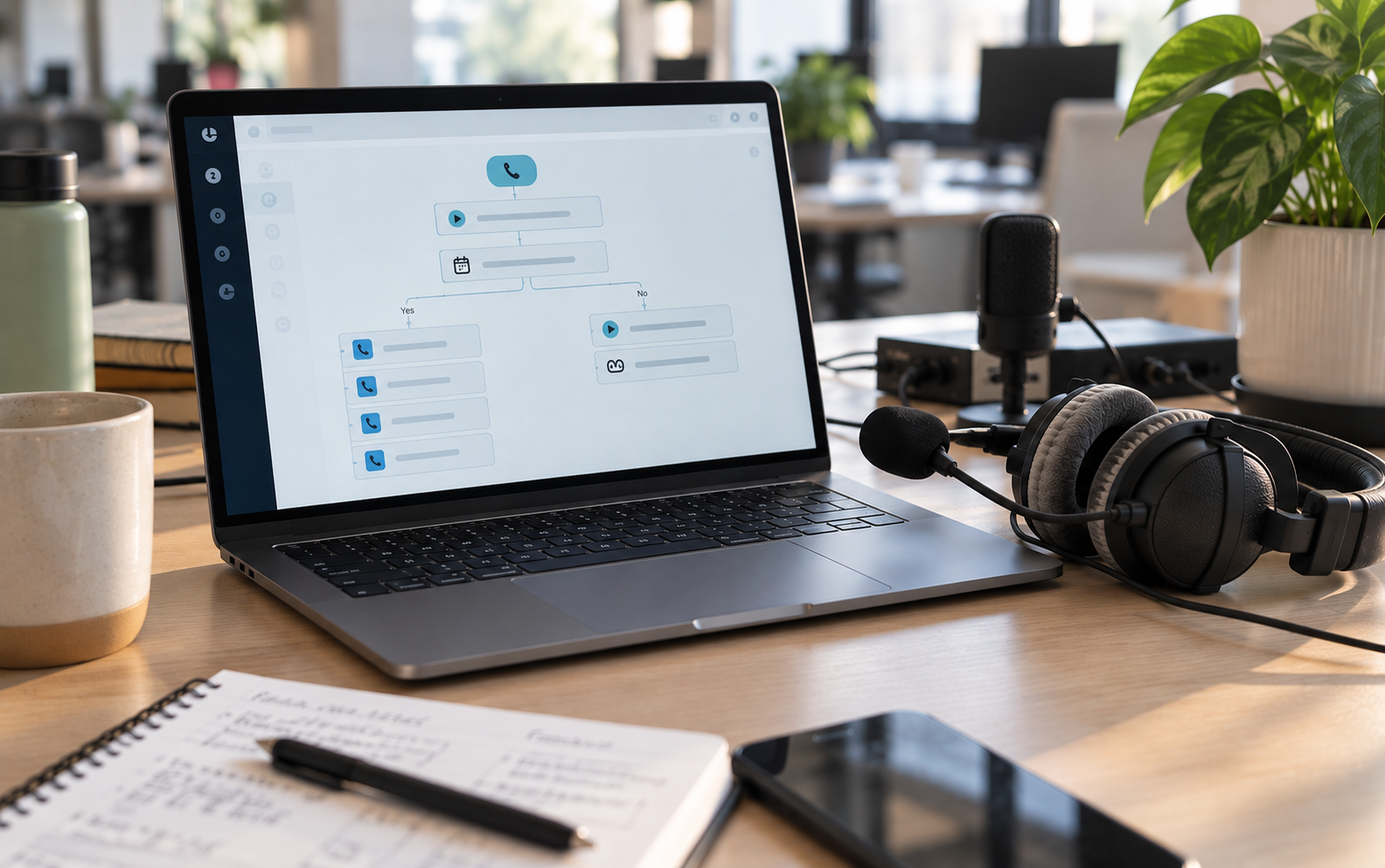
A healthcare IVR is never just one greeting. When every line of the phone tree was recorded at a different time by a different person, patients notice.

Choose from 150+ professional voice artists, or use Phonzai AI voices when a message has to change today.

Main number

IVR menus that route to every hospital, clinic and service line

Scheduling and refills

Central scheduling, referral and pharmacy refill prompts

Nurse line

Triage routing and after-hours instructions

Billing

Insurance and patient financial services menus

Trusted by 100,000+ businesses worldwide

  • United logo
  • NYU logo
  • TD Bank logo
  • RE/MAX logo
  • UCLA logo
  • Expedia logo
  • Blue Shield logo
  • Pepsi logo
  • DoorDash logo
  • AT&T logo
  • Audi logo
  • Marriott logo
  • Costco logo
  • Disney logo
  • Salesforce logo

Voice over recordings

Choose from our selection of over 150 premier voice-over artists to record your professional, brand-consistent IVR voice prompts & greetings. Available in English, Spanish, French, and more.

Learn more


Image

Advanced text-to-speech AI voices

Instantly create professional, engaging contact center greetings, voice prompts and on-hold messages with Phonzai's advanced text-to-speech technology, featuring an extensive selection of lifelike voices in 70+ languages.

Learn more

Unlimited music

Access thousands of pre-licensed music on-hold tracks to set the perfect mood for your patients. Choose from a wide selection of musical styles, including rock, classical, hip-hop, holiday, and more.

Listen to our music

Image

Cutting-Edge AI Capabilities

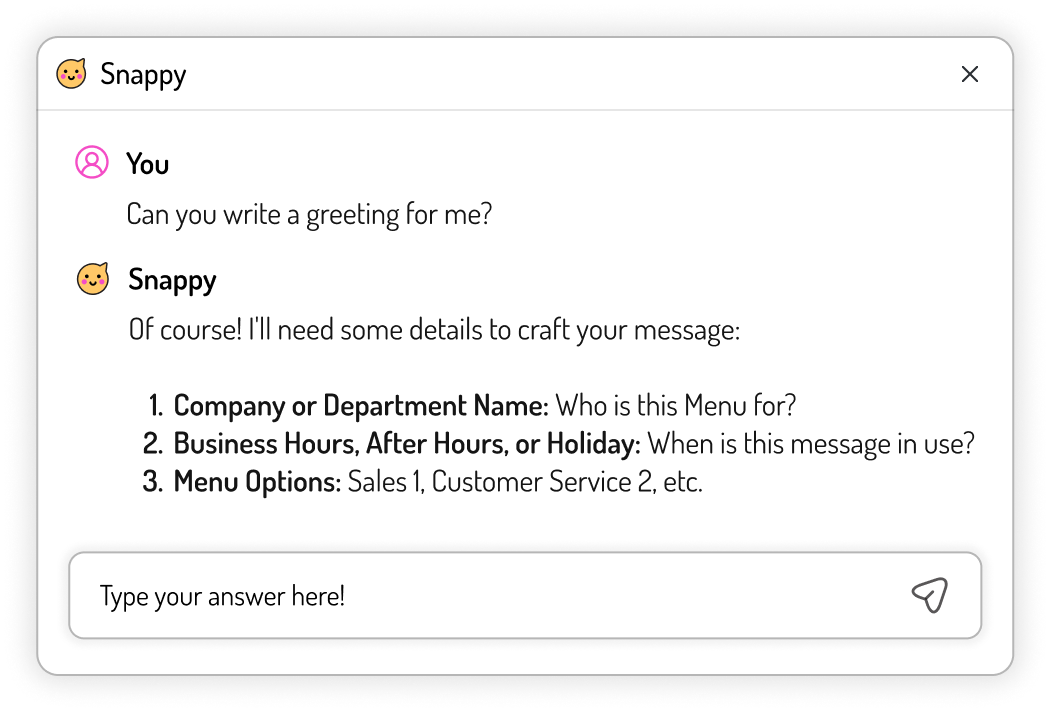
AI Writing Assistance

Get help writing prompts that guide patients clearly, from the emergency instruction at the top of the menu to scheduling, refill and after-hours options.
AI Writing Assistance Learn more

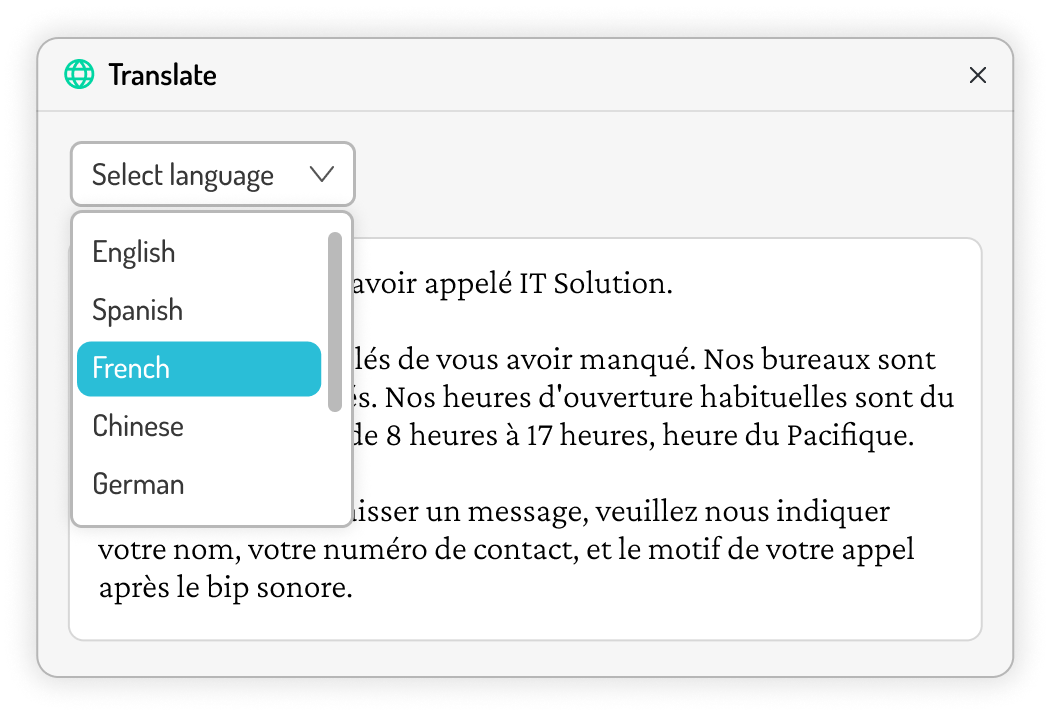
Built-In Script Translation

Record prompts in English, Spanish, French and more with professional talent, or translate scripts with AI and produce them in 70+ languages, including Spanish and French Canadian.
Built-In Script Translation Learn more
Healthcare contact center agents in teal scrubs taking patient calls

What we record for healthcare IVR systems

  • Main menu and department routing for every hospital, clinic and service line
  • Central scheduling, referral and pharmacy refill prompts
  • Nurse line and after-hours instructions
  • Billing, insurance and patient financial services menus
  • Holiday, weather and closure messages
  • On-hold messages that answer common questions about patient portals, forms and flu shots

Works with your platform

GenesysFive9NICE CXoneRingCentralAmazon ConnectAvayaCiscoand more

Enterprise

Built for multi-location healthcare teams

Update hundreds of messages at once

Create and update messages in bulk from a spreadsheet, personalizing provider names, hours and locations. Then assign voices, preview, approve and download in batches.

Teams, roles and projects

Organize messages into shared or private projects by clinic, region or specialty. Invite teammates to edit, review or simply stay informed, without risking what patients hear.

Enterprise plan

Custom configurations for 100+ phone lines

  • 1M+ AI voice credits
  • Unlimited projects
  • 5 seats, add more anytime
  • Private projects
  • Dedicated success manager
  • Private onboarding & training
  • Migration support
  • SLA guarantees
  • API access & support
  • Offline invoicing & POs
Talk With Us
Healthcare IVR by setting

Built for every kind of care

Every healthcare IVR system shares the same basics, but a hospital main line, an urgent care clinic and a pharmacy refill line each need a different menu. Pick yours to see what we record for it.

IVR for hospitals and health systems

A hospital’s main number is the front door for every department. The menu has to give the emergency notice first, route callers to the right service line in two or three steps, and keep clinical and billing calls apart. We record the full tree, from the greeting to every department prompt, in one consistent voice.

  • Main number and department routing
  • Central scheduling and referrals
  • Nurse line and on-call routing
  • Patient financial services

IVR for multi-site clinic groups

When a group runs dozens of clinics, every location needs its own hours and options without sounding like a different organization. We record a shared core menu plus location-specific prompts, so each site stays accurate and every caller hears the same voice.

  • One voice across every location
  • Location and hours by site
  • New provider announcements
  • Same-day closure updates

IVR for urgent care

Urgent care callers want three things fast: are you open, how long is the wait, and where is the nearest location. Short prompts answer those first, then route walk-in and appointment questions without making patients sit through a long menu.

  • Hours and wait-time guidance
  • Walk-in vs. appointment options
  • Nearest location routing
  • Holiday and weather closures

Pharmacy IVR

Most pharmacy calls are refills. A good pharmacy IVR gets refill callers through in seconds, tells them what to have ready, and sends medication questions to a pharmacist. Hold messages can point patients to online and app refills.

  • Prescription refill line
  • What to have ready
  • Pharmacy hours and locations
  • Medication questions routed to a pharmacist

IVR for specialty groups

Cardiology, orthopedics, oncology and other specialty groups handle referrals, procedure scheduling and prep questions that general menus don’t cover. We record prompts written for each specialty, with hold messages that answer the questions your team hears most.

  • Procedure scheduling and prep
  • Referral intake
  • Imaging and lab results lines
  • Specialty-specific hold messages

IVR for behavioral health

Behavioral health callers need a calm, plain-spoken menu. The crisis line notice comes first, intake and scheduling are easy to find, and after-hours prompts point callers to the right resources.

  • Calm, plain-spoken prompts
  • Crisis line notice up front
  • Intake and scheduling
  • After-hours resources
‘RealVoice’
‘Phonzai’ Instant AI
Healthcare IVR checkup

8 questions to ask about your IVR

Run your main number through this list. If you answer no to any of them, your patients are hearing it.

  1. Is the emergency notice the first thing callers hear?

    It should come before any menu option, so no one waits to hear it.

  2. Is Spanish offered in the first prompt?

    Callers who need another language shouldn’t have to sit through the English menu first.

  3. Does each menu have five options or fewer?

    Long menus send callers to the operator. Group options and go one level deeper instead.

  4. Does every line use the same voice?

    A patchwork of voices recorded over the years makes a health system sound disconnected.

  5. Do callers know what to have ready?

    A prescription number or date of birth, said up front, shortens every call that follows.

  6. Is hold time doing work?

    Hold messages can answer portal, forms and flu-shot questions before staff picks up.

  7. Are after-hours and holiday messages current?

    An old closure message is the fastest way to lose a caller’s trust.

  8. Can you change a prompt today?

    If a single update means re-recording the whole menu, your IVR will fall behind.

Keep your IVR current

Your healthcare IVR, season by season

A healthcare IVR changes all year. Holidays, weather, new providers and flu season all mean new prompts, and every out-of-date message is one more call your staff has to answer. Here’s what most health systems update, season by season.

Dec – Feb

Winter

The busiest stretch for closures. Callers need to know quickly whether you’re open.

  • Holiday hours and closuresChristmas, New Year’s and MLK Day hours on every line, then back to normal on time.
  • Weather and snow closuresA same-morning closure message across every clinic in the storm’s path.
  • New-year insurance remindersRemind patients to bring updated insurance cards and know their new deductible.
Mar – May

Spring

Hours shift and teams grow. Your menu should keep up.

  • Daylight saving hours changesUpdated hours for clinics that open earlier or close later.
  • New providers and locationsAnnounce new physicians, specialties and sites so callers route correctly.
  • Memorial Day closuresHoliday hours and where to go for urgent care.
Jun – Aug

Summer

Schedules change and families plan ahead.

  • Summer hoursShortened Friday or weekend hours, clearly stated.
  • Independence Day closuresHoliday hours and on-call options.
  • Back-to-school physicals and vaccinesHold messages that point parents to booking before the rush.
Sep – Nov

Fall

Call volume climbs with flu season and enrollment.

  • Flu shot clinicsDates, locations and walk-in options, on hold and in the menu.
  • Open enrollment questionsRoute insurance and billing questions before they reach clinical lines.
  • Thanksgiving closuresHoliday hours, plus the end of daylight saving time.

Same-day changes with Phonzai

Closures, hours and last-minute updates go live in minutes with AI voices, and you can push one change to every location at once.

See how Phonzai works

Planned updates with voice talent

Book recordings with a real, professional voice talent. Ready in 3–4 business days, or 1–2 with rush delivery.

Ask about discounted word credit packages

Let’s talk

We’re never too busy to talk to someone as nice as you.
Get in touch with us and start the conversation. We’d love to hear from you.

Healthcare IVR questions

What is a healthcare IVR system?

A healthcare IVR (interactive voice response) system is the automated phone menu patients hear when they call a hospital, clinic or health system. It greets callers, gives the emergency notice and routes them to scheduling, pharmacy refills, the nurse line, billing and individual departments. Snap Recordings records every prompt in that menu with professional voice talent or Phonzai AI voices.

How is IVR used in healthcare?

Health systems use IVR to answer high call volumes without adding staff. Common uses include appointment scheduling and reminders, prescription refill lines, nurse triage routing, billing and insurance menus, patient portal help, and after-hours, holiday and weather messages. A clear, consistent IVR gets patients to the right place on the first try and keeps clinical lines open for clinical calls.

What should a pharmacy IVR include?

A strong pharmacy IVR offers a direct path to refills, tells callers what to have ready (such as a prescription number), and gives pharmacy hours and location options. It also routes questions about a medication to a pharmacist. Short, plain prompts keep refill calls fast, and hold messages can point patients to online or app refills.

Do you record hold messages too?

Yes. On-hold messages are one of our specialties. We write and record messages that answer common questions while patients wait, such as how to use the patient portal, where to find forms or when flu shots are available, and mix them over licensed hold music.

Can we use the same voice across all our hospitals and clinics?

Yes. Choose one professional voice artist or one Phonzai AI voice and use it on every line in every location, so patients hear the same voice whether they call the main number, a clinic or the pharmacy. Enterprise teams organize prompts by location, region or specialty, so each site’s hours and options stay current without losing that consistency.

How quickly can we update a prompt?

With Phonzai AI voices, you can create or change a prompt yourself and download it in minutes, which is ideal for closures and schedule changes. Professional voice talent recordings take 3–4 business days from the time your order is placed and scripts are confirmed, and rush service delivers in 1–2 business days. Either way, you get broadcast-quality audio.

Can you record prompts in Spanish and other languages?

Yes. Professional voice talent records in English, Spanish, French and more, and Phonzai AI voices cover 70+ languages. Built-in AI translation can turn your English script into the language you need.