
How to choose an AI voice for your business phone system
Learn about the technology behind Phonzai’s different voice models, and how to pick the right one for your business.
Selecting an AI voice is about matching the right personality to your brand and reflecting the demographics you serve — but there's more to it than that. Different voices are driven by different tech under the hood, and understanding how they work matters when you're responsible for creating hundreds of messages a year for your business phone system.
Phonzai has two voice models. V2 produces a more realistic, human-like read — a fresh performance every time you generate audio you can listen to. V1 is fully consistent — the same audio every render, as long as the content stays the same. The right pick depends on your priorities: V1 when scale and consistency matter most; V2 when a natural, human-sounding read matters most. Here's how they compare.
Phonzai offers voice models: V1, V2, — each built around a different job in a modern phone system. Here's what each one does well, and where each one fits in a real phone system.
Perfect for large phone system rollouts
Built for scale, consistency, and locked workflows. The bedrock of enterprise phone messaging.
Lifelike warmth with natural pacing
A more natural sounding caller experience without giving up the professional tone of V1 voices.
One voice, every language
Your V2 voice speaks 90+ languages, giving you a unified brand voice across every bilingual message.
Why AI voice models matter in 2026
Different models, different mechanics.
In practice, these differences matter pretty quickly if you're generating phone messaging at scale. For large organizations deploying similar prompts across hundreds of locations without re-auditing every file for pronunciation issues, tonal shifts, or unexpected variations — consistency matters.
Other businesses may care more about making the caller experience sound warm, conversational, and human — and don't mind using voices that might take a few tries to get the perfect message.
Phonzai voice models at a glance
| V1 | V2 | |
|---|---|---|
| Consistency between renders | Same audio every time you render. | A fresh performance each render — like a new take from a voice actor. |
| Realism & natural pacing | Steady, professional read. | Natural flow that adapts to the script. |
| Language coverage |
Many languages available. |
Each voice can switch languages — including mid-sentence — across 90+ languages and accents. |
| Bulk & multi-location fit | Ideal — every render is identical across your system. | Great, with slight variation between renders. |
| Best for | IVR menus, multi-location, bulk production | Greetings, on-hold, bilingual, seasonal, branded messages and marketing |
V1 voices — dependable and built for large phone system rollouts.
The bedrock of enterprise messaging.
V1 voices are the bedrock of enterprise business phone messaging. They prioritize consistency above all else, making them the fastest and most reliable way to generate predictable audio at scale. For businesses deploying messaging across hundreds or thousands of locations, consistency matters — approvals move faster, QA becomes simpler, and teams can confidently re-render scripts without worrying about unexpected pronunciation changes or delivery shifts.
When you create a message, revise a sentence next week, and revisit it again three months later, the voice will sound effectively identical aside from the words you changed. That predictability is the whole point.
The trade-off is that V1 prioritizes stability and ease of use over emotional nuance. But for most callers, the difference between V1 and V2 is subtle — especially in short-form phone system messaging, like IVR prompts. If your phone system runs at scale — thousands of greetings across hundreds of locations, frequent updates, compliance reviews, scheduled refreshes — V1 is doing real work. Consistency is the feature, not a limitation.
Where V1 excels
V1 voices are also still impressively human. Modern TTS handles names, numbers, and punctuation with the kind of phrasing you'd expect from a calm narrator. They aren't yesterday's robotic voices; they are well-trained, well-tuned, and well-suited to scaled phone systems. The voice doesn't get more excited at the end of a sentence, doesn't slow down on the punchy lines, doesn't shift register between an opening greeting and an after-hours apology. That clear uniformity is exactly what callers expect when navigating a phone tree.
Ready to scale up?
Bulk phone system audio, done right.
Order a recording with a human voice talent through RealVoice, or render thousands of consistent prompts with Phonzai →
V2 voices — more natural, still production-stable
A more conversational caller experience.
V2 voices are Phonzai's newest voice model — built on the latest AI voice technology. The shorthand: V2 steps up the natural pacing, providing a realistic AI voice that bridges the gap between required consistency and human warmth for a better caller experience. A few things change between V1 and V2.
The voice breathes
V2 voices linger slightly on certain words, soften on others, and pause where a person would naturally pause. The result listens more like a real conversation than a script.
It reads sentiment
V2 models adjust delivery in real time — warmer on a thank-you, calmer on a clinical instruction, steadier on an emergency notice. Same persona; just not monotone.
Subtle, human variation
Subtle breaths, light vocal warmth, and natural variation between sentences make the output feel less like recorded TTS and more like an experienced voice over talent.
Still safe to lock
Even with subtle variation between renders, every V2 read lands in the same business-professional register — perfect for phone systems.
That last point is what makes V2 a real upgrade rather than a stylistic swap. You get a more lifelike read with most of the reliability you've come to expect from V1. For a lot of businesses that's the sweet spot: a more conversational caller experience without giving up the ability to lock and re-render a script confidently.
"V2 widens the menu — it doesn't replace V1. For 200 menu updates, V1 is probably still the right call. For a boutique hotel that wants its welcome to sound warm and intentional, V2 is the obvious move.
— Field Note
Multilingual — V2 voices in 90+ languages and accents
One voice, 90+ languages and accents, mid-sentence switching included.
V2 voices speak 90+ languages and accents. The same voice you chose for your main English greeting can be used in any language — no more separate alternating voices for bilingual prompts like "For English press 1, para español oprima 2." Everything is spoken by one voice.
That distinction matters. If you already picked a V2 voice for your English greeting, that same voice can now handle any audience or market you serve — Spanish text-to-speech, French, Mandarin, or 90+ other languages. No separate voices to choose. No new casting decisions. Just one brand-aligned voice identity for your entire phone system.
Note: multilingual runs on V2. If a message is still on V1 for scale or compliance, keep it there — when you move it to V2, multilingual is already there.
The standout feature — mid-sentence language switching
Most multilingual voice systems require you to write the entire prompt in one language. That works for a clean greeting. It breaks the moment your business name, brand name, or location needs to stay in English inside an otherwise-Spanish greeting.
Example:
"Gracias por llamar a Rosemont Family Dental. Nuestro horario de atención es de lunes a viernes."
That's the read a lot of medical, legal, and retail brands need — Spanish greeting, the company name and store location in english, then back to Spanish for the rest of the message. Most AI voices fumble the transitions: business names get read with a Spanish accent, or the voice re-triggers itself and adds an awkward pause. Multilingual V2 handles the switch cleanly — brand names stay pronounced the way you say them, and the surrounding language holds its own accent.
How it works
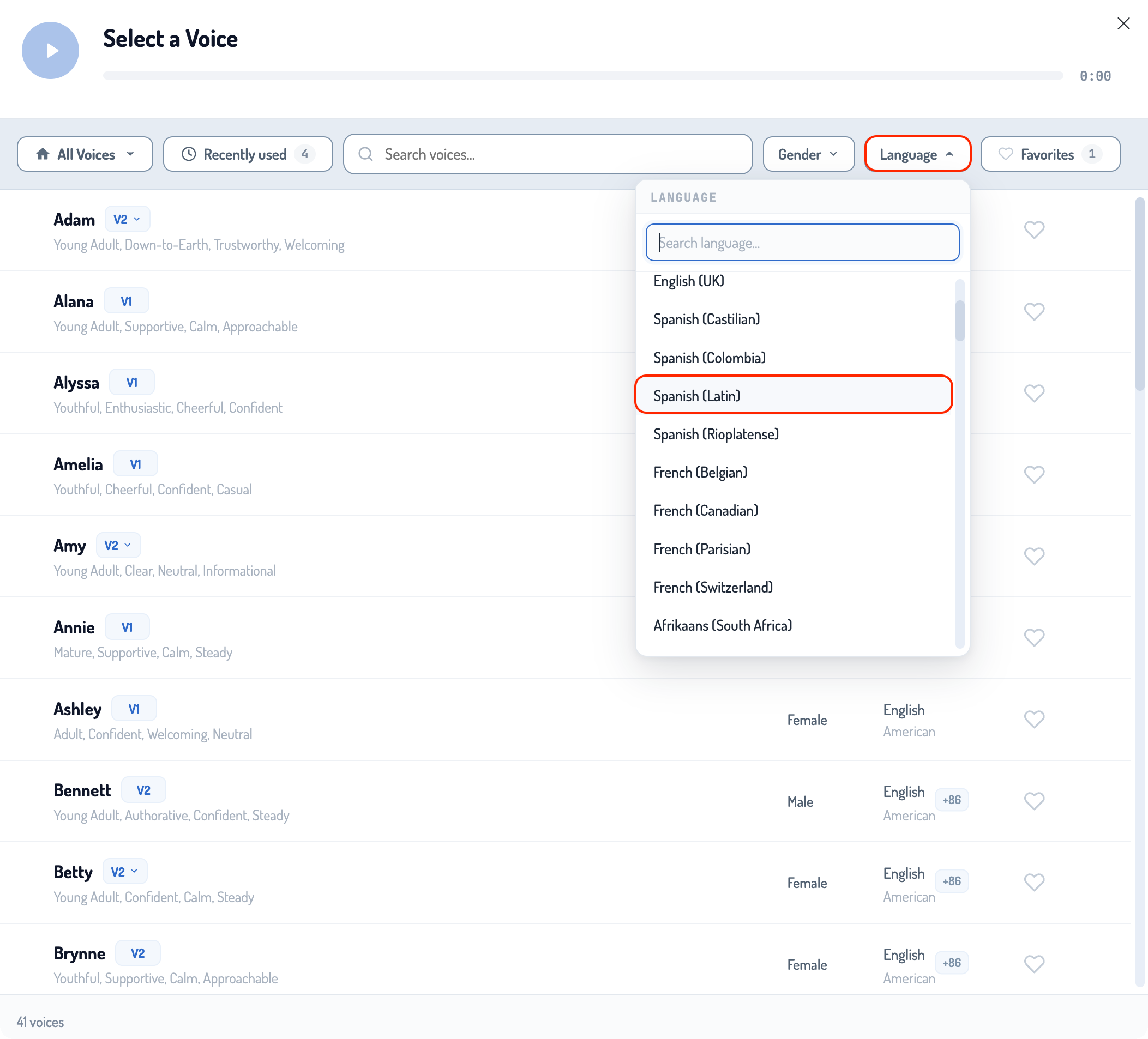
- Pick your voice. Open the voice picker and filter by the main language your message will be spoken in. Choose the V2 voice that fits — it can speak any of your other 90+ languages when you need it to.
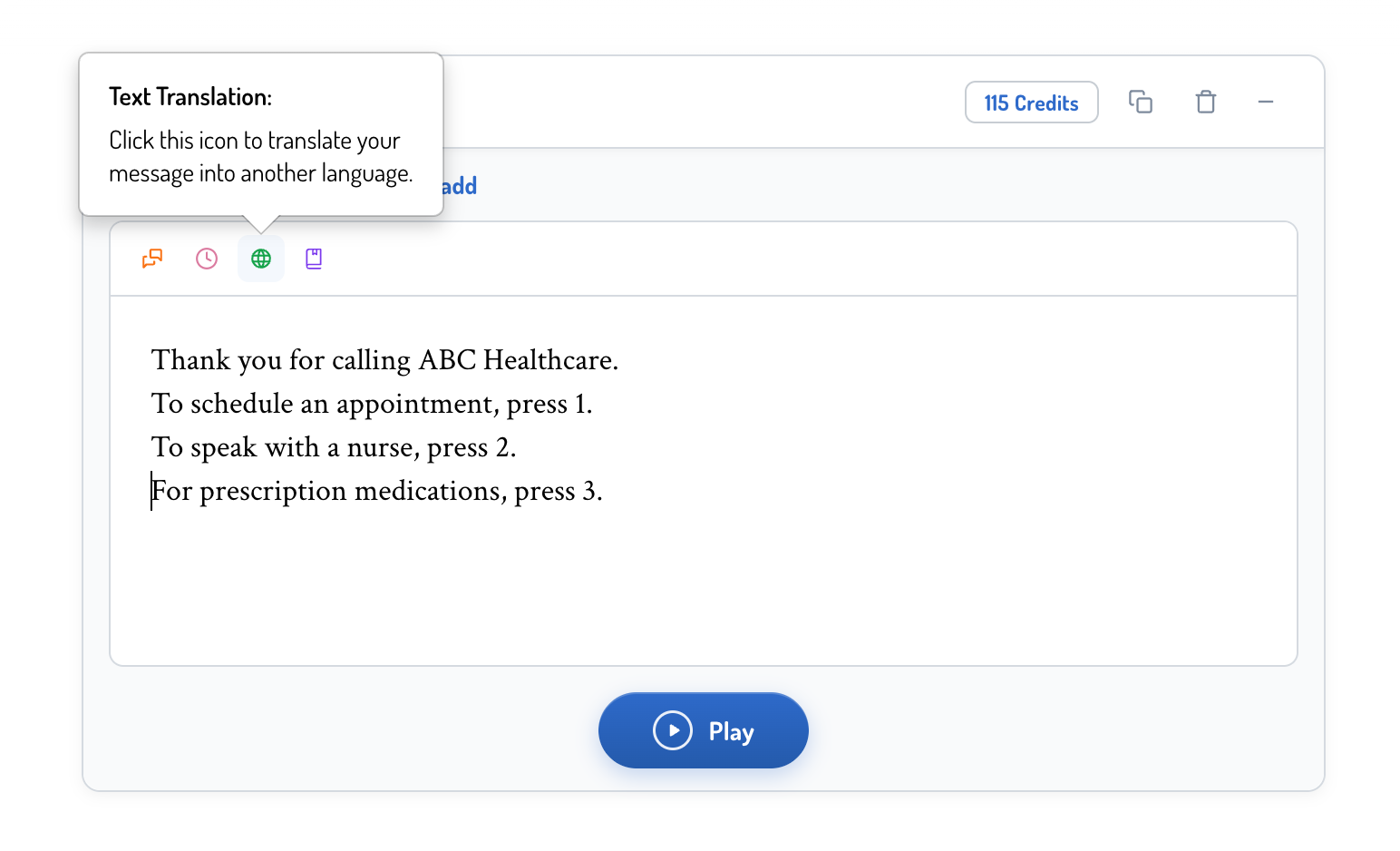
- Write your message. Compose the script in your primary language. Phonzai has built-in translation — click the green globe icon to translate any section into another language automatically.
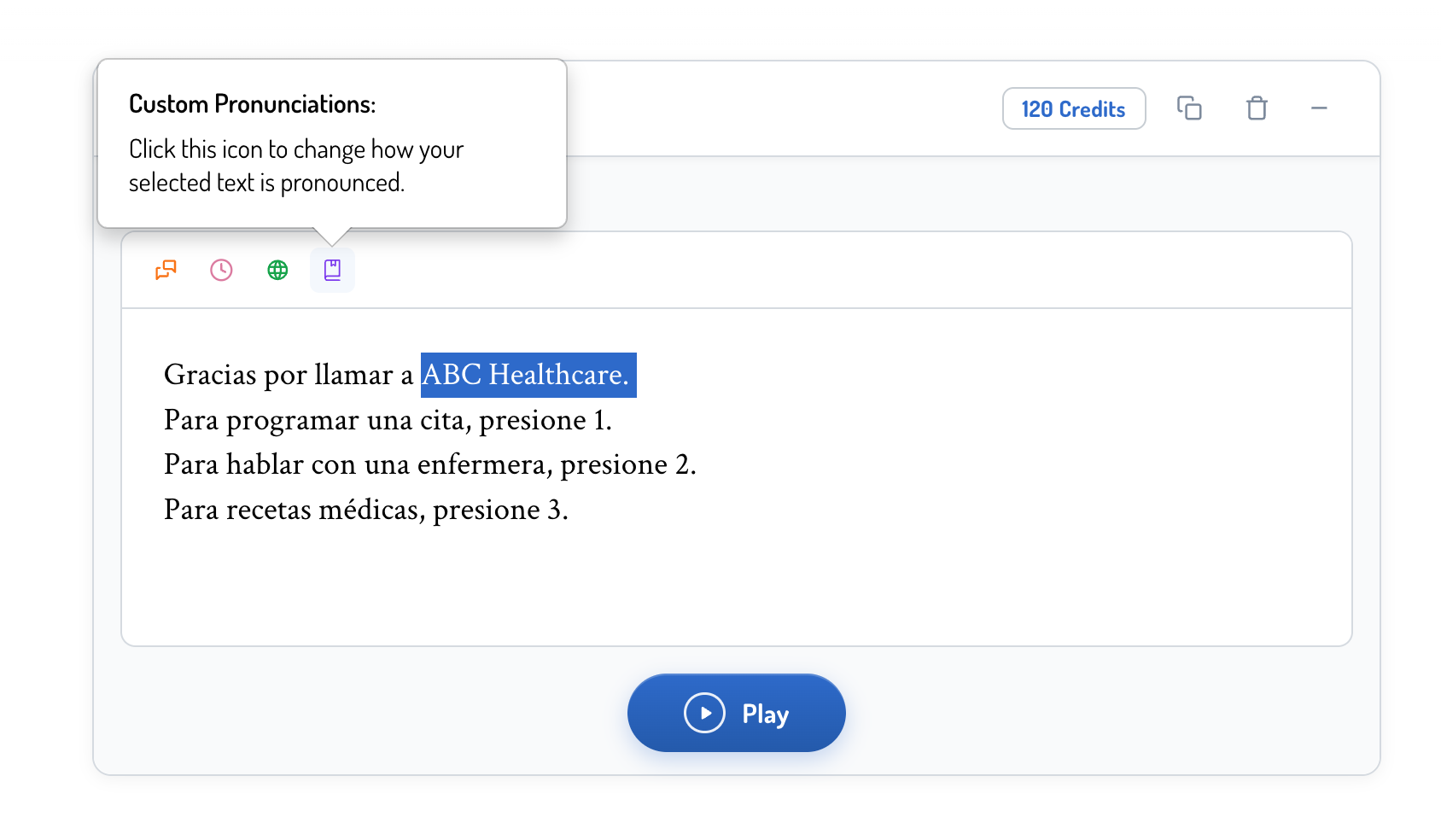
- Mark the language switch. Highlight the portion of the script that needs to be spoken in a different language and click the purple Custom Pronunciations icon.
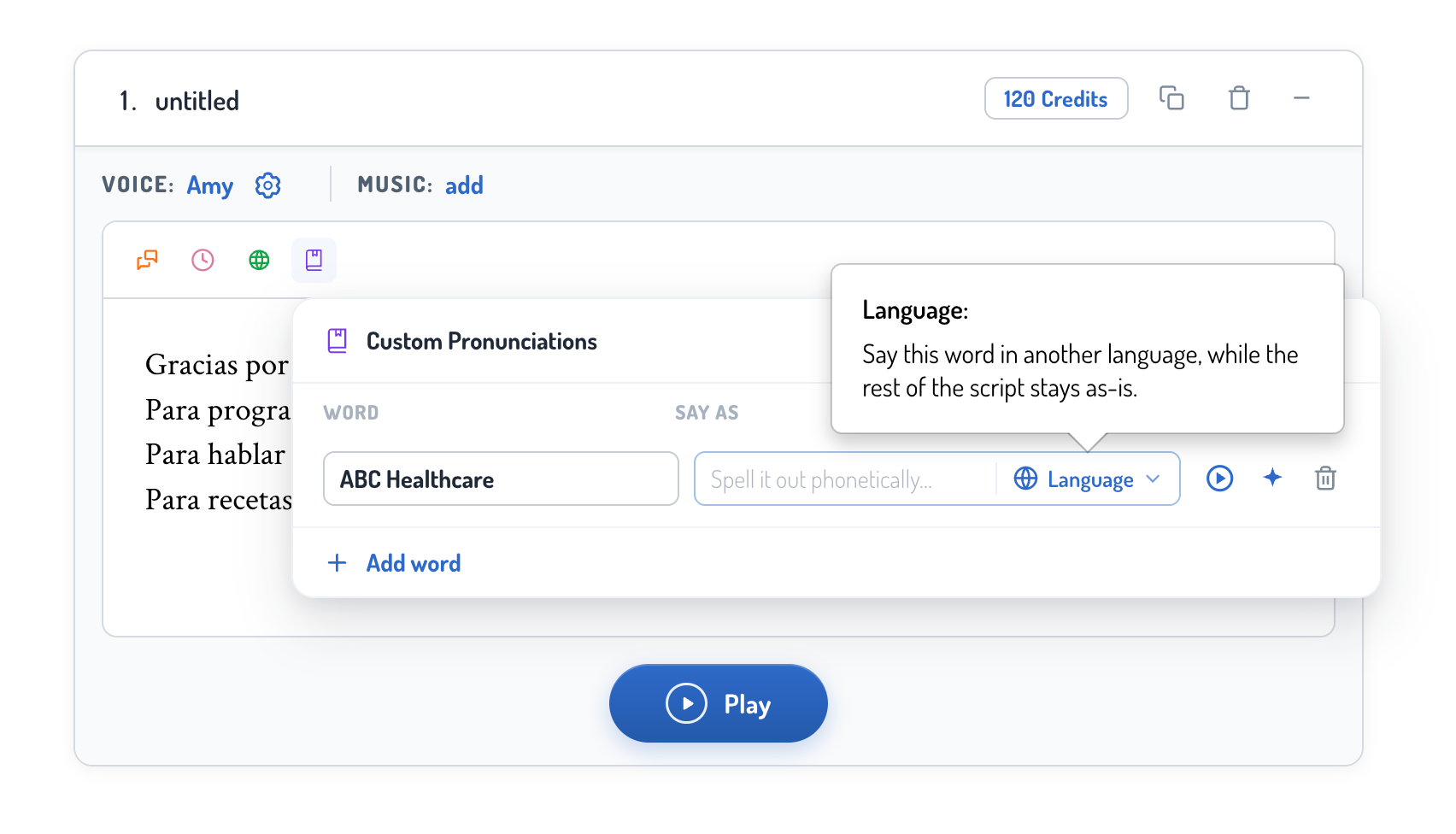
- Set the language for that phrase. In the popup, open the Language dropdown and pick the language that phrase should be spoken in. For unique business names, brand names, or locations, you can also spell it out phonetically for extra pronunciation control.
- Play the message. Click play to hear the result.
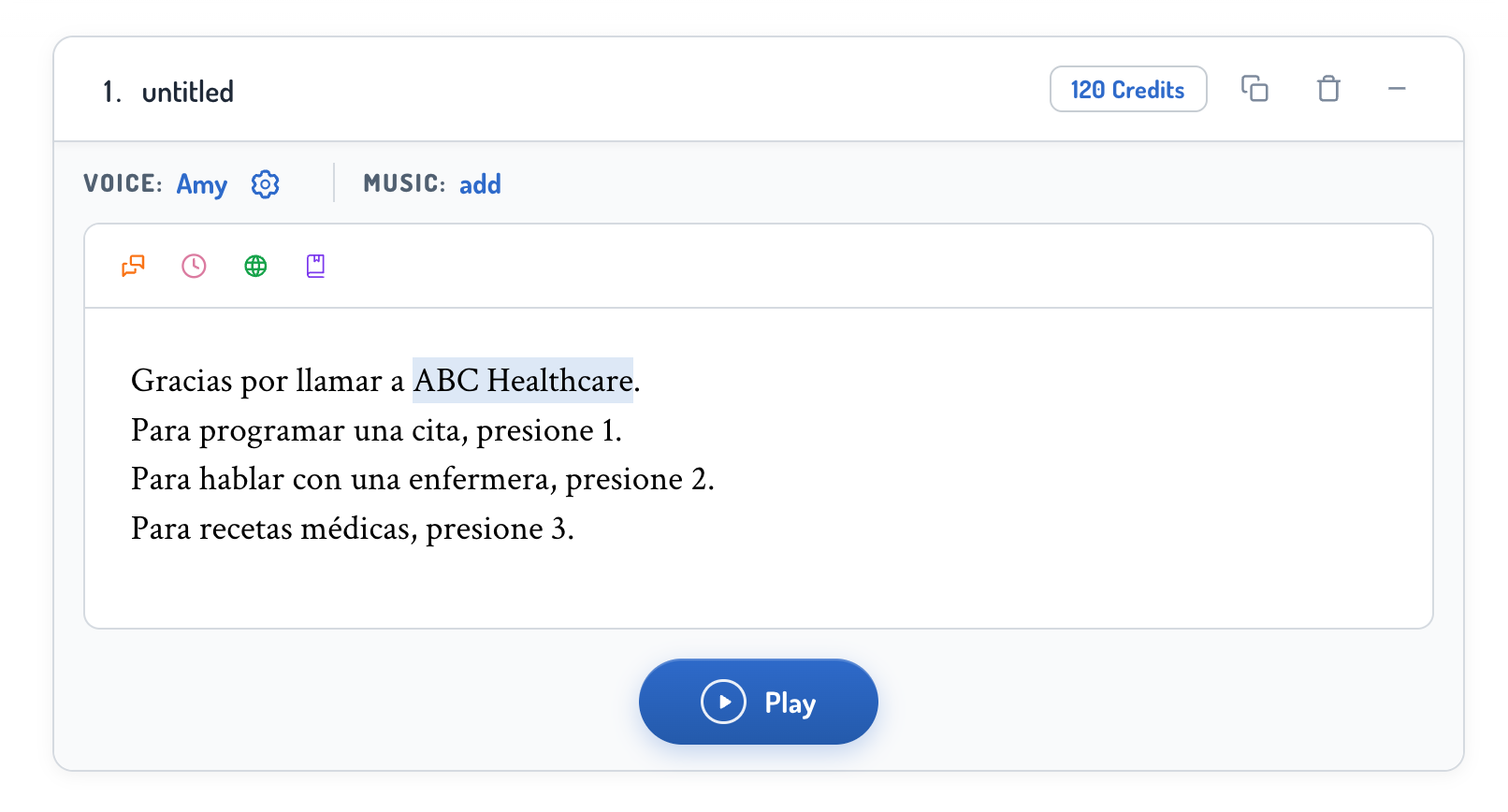
Once a custom pronunciation is saved, it stays highlighted in your script. Every time you use that voice with the same language selection, the setting applies automatically — you don't have to re-mark it on future messages.
That’s what makes multilingual V2 practical at scale. A bilingual English/Spanish IVR — “Thank you for calling ABC Healthcare. Para español oprima 6.” — reads in one consistent voice. A multi-location brand can serve different regions in different languages without casting a new voice for each. Retail, hospitality, and healthcare chains can shift language by market while keeping the same brand voice. And a new-market phone tree launch stops requiring a different voice per language.
Choosing the right voice for the moment
A short decision matrix.
Use V1 when
Consistency & efficiency are the requirement
Bulk production, compliance-reviewed prompts, multi-location uniformity, anything you want to render the same way every time.
Use V2 when
The caller experience should feel more human
Greetings, on-hold, after-hours notices, departmental menus — anywhere a more natural read makes the message feel intentional.
Use MultilinguaL
When your callers speak more than one language
Bilingual customer bases, multi-location brands, international rollouts — anything where one voice needs to hold its brand feel across more than one language.
Some businesses stick to one voice model and some will eventually use a mix. A hospitality group might keep V1 on its bulk IVR menus, move on-hold messaging to V2, and use Multilingual for bilingual callers or international rollouts. None of those choices is wrong. Different voice models are calibrated for different jobs.
Finding V1 and V2 in your voice library
Every voice in Phonzai carries a badge next to its name that tells you which model it runs on — V1 or V2.
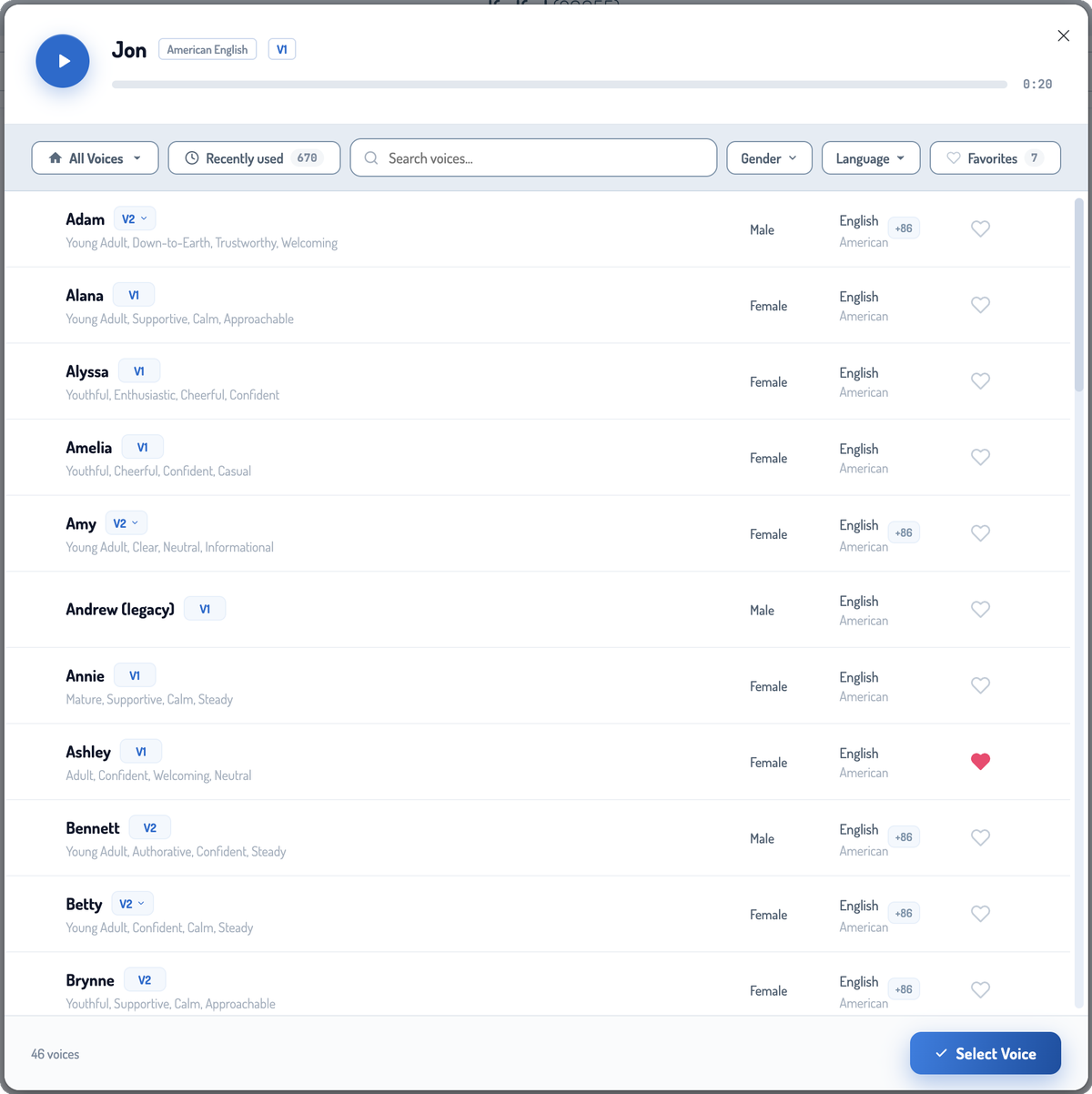
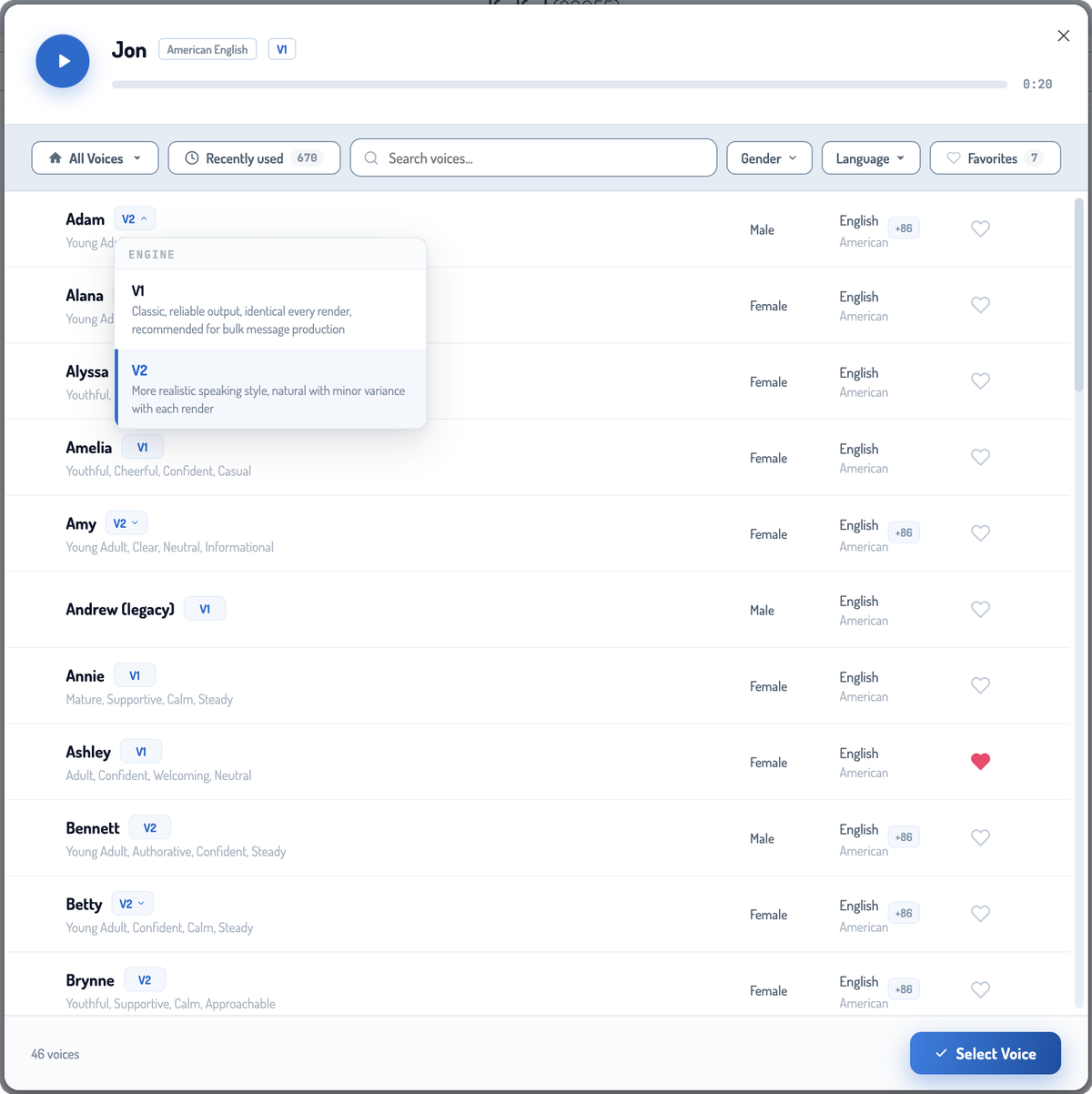
If you see a small dropdown arrow next to a V2 badge, that voice supports both models. Click it to switch between V1 and V2 for the same voice — useful when you want the same brand identity across bulk audio (V1) and customer-facing touches (V2).
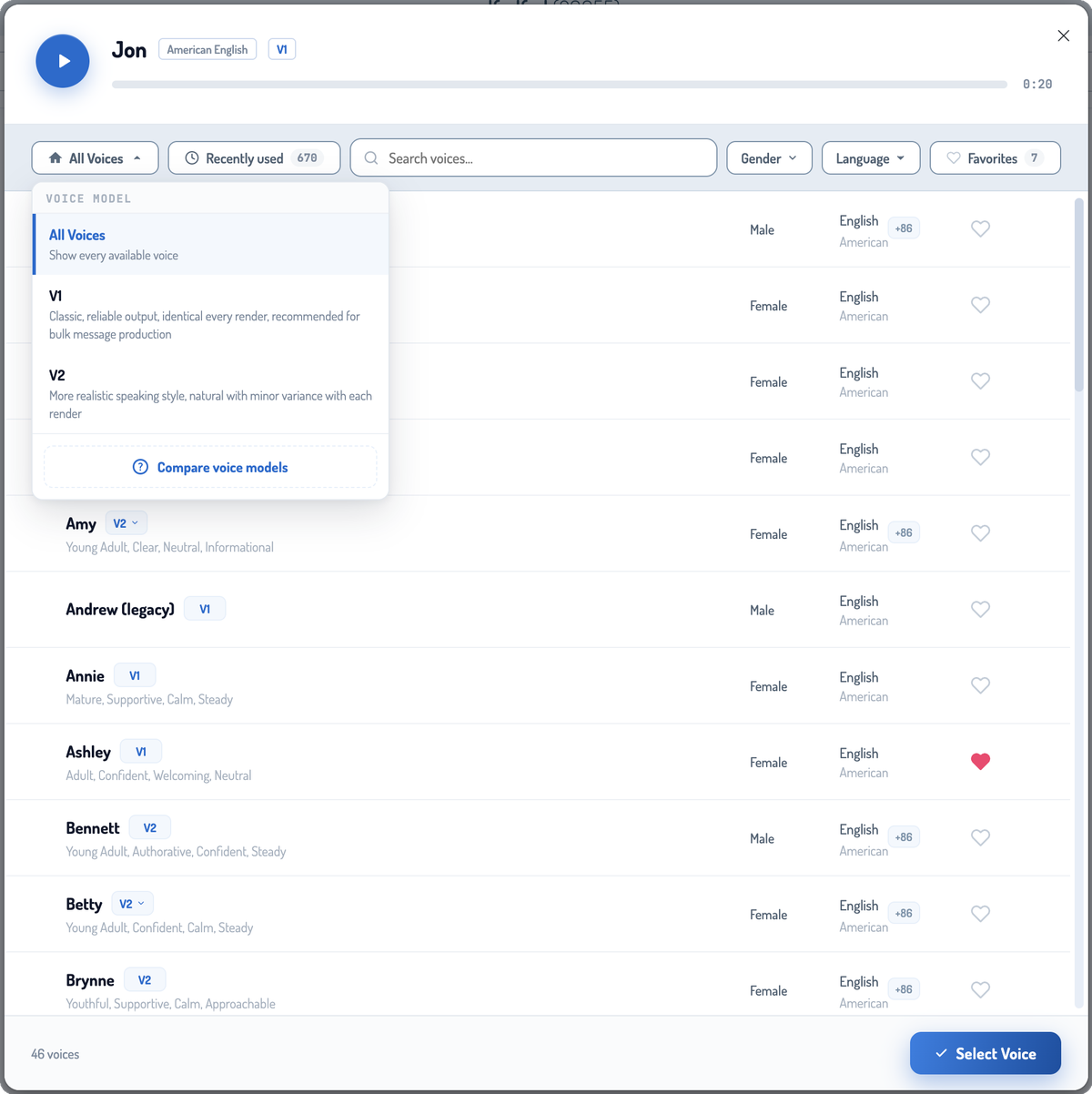
At the top of the library, the All Voices filter lets you narrow the list by model. Set it to V1 to see only classic voices, V2 to see only the more natural reads, or leave it on All Voices to browse everything.
Use cases by industry
How each model lands in practice.
Healthcare
01V1 stays the workhorse for clinical scripts, appointment reminders, and HIPAA-reviewed phone trees. V2 fits front-desk greetings and after-hours messages where a warmer voice lowers caller anxiety.
Hospitality
02Boutique hotels, spas, restaurants, and tour operators rely on caller experience as a brand cue. V2 brings the realism.
Banking & financial services
03V1 still dominates here for compliance reasons. The wording is reviewed, approved, and re-rendered on a schedule. V2 can take over greetings and on-hold messages where the script is stable and the brand wants a softer feel.
Retail & multi-location
04A mixed approach works best. V1 for ready-to-deploy templated menu greetings, and V2 for wherever branding matters — like promotional or informative on-hold messages.
Contact centers
05V1 for menus and queue announcements. V2 for wait-time language and check-in prompts where a more human read reduces caller frustration.
Marketing & ops teams
06V2 covers most of the everyday work that benefits from a warmer read.
What to know before you update to V2
Five practical notes.
You don't have to migrate everything
Most businesses run V1 and V2 side by side, and many voices have both V1 and V2 options. There's no penalty for keeping bulk IVR on V1 while moving engaging greetings to V2.
Re-listen to your scripts when you change models
Phrasing that sounded fine in a V1 voice may want a small rewrite in V2 for a more natural read. Contractions, sentence length, and punctuation all play differently when the voice is actually breathing through the read.
Try a retake first
If a phrase sounds off, click “Retake” before adjusting your custom pronunciations. V2 renders each message with a unique performance, so a saved pronunciation can sound slightly different depending on the surrounding sentence — a single retake often fixes what looks like a pronunciation issue.
Approval workflows still apply
V2 is reliable enough for production, but it's worth reviewing any greeting before deploying.
Voice talent is still part of the system
Phonzai AI voices are one option; RealVoice (human voice talent) is the other. For a flagship welcome, a key brand spot, or a long-form on-hold message, a hired voice talent is still the right call for many businesses. The options work better together than apart.
Where the future is headed
A complete solution.
Phone-system audio now offers a complete spectrum of voice models, ensuring operations and marketing teams have the exact tool they need, whether prioritizing absolute scale or high-touch style.
The good news: you don't have to overhaul anything to get the benefit. The fastest path is usually a few targeted swaps. Move your daytime greeting to V2. Refresh your on-hold message. Re-render your auto attendant menu and listen back. Keep your bulk and your locked scripts on V1.
V1
Scale and consistency
For locked, bulk, and compliance-reviewed audio.
V2
A more natural caller experience
For greetings, on-hold, after-hours, and seasonal moments.
Brand personality at the front desk
For the moments where tone is part of the message.
Ready to hear the difference?
Map the right voice to the right moment.
Order a recording with a human voice talent through RealVoice, or create messages with Phonzai V1 or V2 voices instantly →

